Working with translations
Learn how to support multiple languages in your plugin with MiniMessage definitions. This extends Paper's internationalization guide. For more detailed information, refer to the documentation.
Common Misusage
When switching from strings to translatable components, be aware of this important difference:
- Component.translatable("key","argument 0"); // "argument 0" will be the fallback translationComponent.translatable("key",Component.text("argument 0"));
Provide Translations 🌍
Learn how to provide translations for your plugin. This improves your development experience by eliminating inline formatting in your code.
To define messages as shown above, follow this guide:
Create a Resource Bundle 📖
Select src/main/resources, press Alt+Insert, select and name it
In src/main/resources/lang, create a new file named and (optionally)
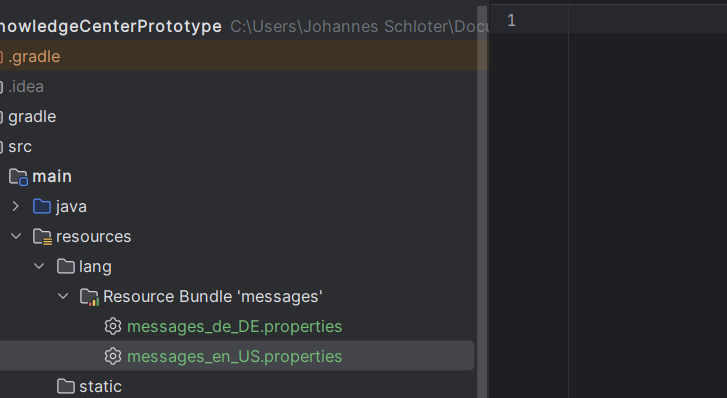
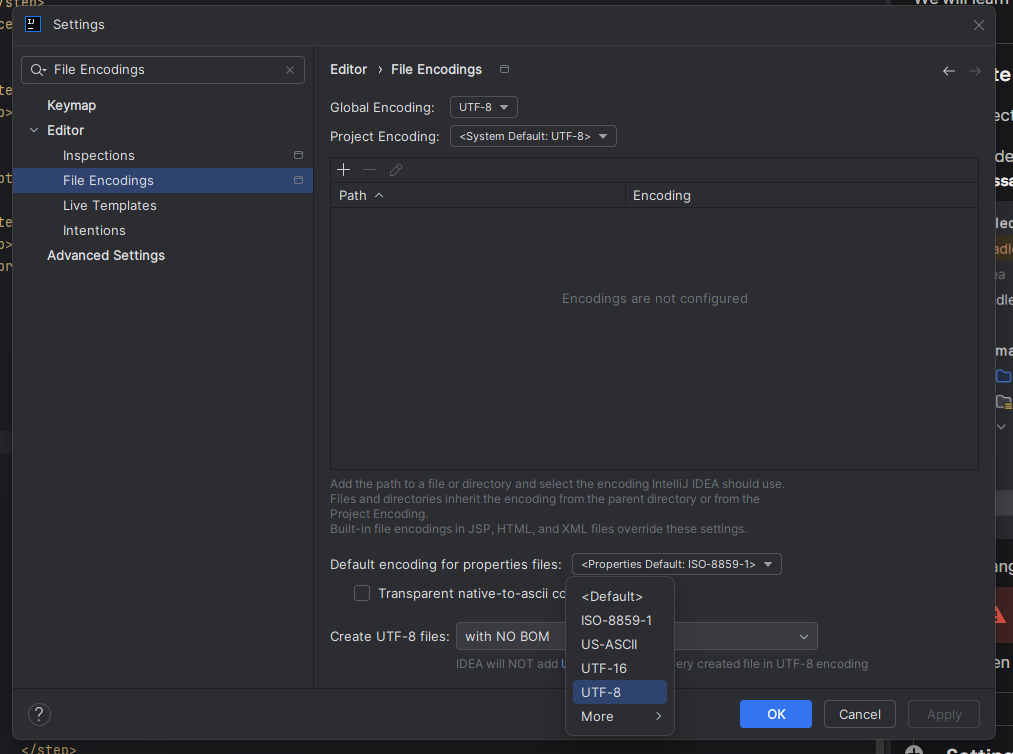
Open Settings by pressing Strg+Alt+S or by clicking
Navigate to
Select UTF-8 in Default encoding for properties files
Set up a custom MiniMessage instance
Create a new
MiniMessageinstance that supports theprefix,hl,ex, andsstags.Since
PREFIXis a constant not set by any configuration, define aMiniMessageconstant:- public static final Component PREFIX = MiniMessage.miniMessage().deserialize("<color:#7c86ff>Essentials</color> <color:#52525c>»</color> <color:#cad5e2>"); public static final TextColor HIGHLIGHT = TextColor.color(0x00bcff); public static final MiniMessage MINI_MESSAGE = MiniMessage.builder() .editTags(builder -> { builder.tag("prefix", Tag.inserting(PREFIX)); builder.tag("hl", Tag.styling(HIGHLIGHT)); builder.tag("ss", Tag.styling(TextColor.color(0x7bf1a8))); builder.tag("ex", Tag.styling(TextColor.color(0xff6467))); }).build();
Load Resource Bundles into the GlobalTranslator
In your JavaPlugin class implementation, define this method:
This loads the German Resource Bundle from your plugin resources:
private void loadLocales() { MiniMessageTranslationStore translationStore = MiniMessageTranslationStore .create( new NamespacedKey(this, "messages"), MINI_MESSAGE // insert your custom instance ); for (Locale locale : List.of(Locale.GERMANY)) { ResourceBundle bundle = ResourceBundle.getBundle( "lang.messages", locale, getClassLoader(), UTF8ResourceBundleControl.get() ); translationStore.registerAll(locale, bundle, false); } GlobalTranslator.translator().addSource(translationStore); // Sets German as the fallback for any undefined language translationStore.defaultLocale(Locale.GERMANY); }